Export tool
The export tool allows you to download your current script from the editor into a JavaScript file, or convert it into other formats.
It also displays the title,website, description, and author fields of
the script's metadata.
The tool can be used for backup or sharing of your userscript.
New in v0.3.8: the Export tool includes a Minify option that minifies the
exported script. Works with any selected option.
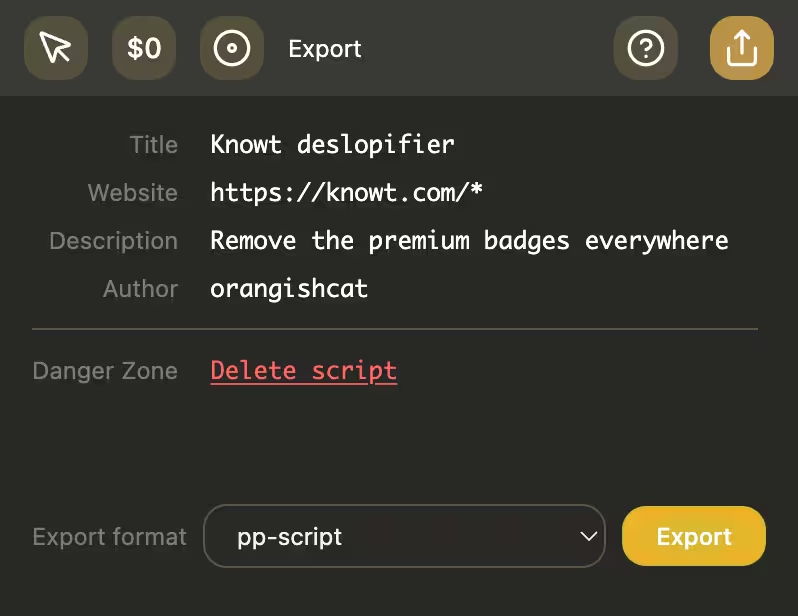
Export formats
pp-script
- Exports the current editor contents as a
.jsfile, as-is without modifications. - Great for backing up scripts and sharing them to other Page Proxy users.
Tampermonkey
- New in v0.3.7: export the current script as a
.user.jsuserscript while keeping Page Proxy runtime support. - Exports a
.user.jsuserscript with a UserScript header. - Converts Page Proxy metadata into userscript metadata such as
@name, website matches, and@run-at. - Adds
@require https://orangishcat.github.io/page-proxy/pp/pp.min.jsso exported scripts can continue using thepa,pn,pq,ps,pt, andpvAPIs outside the extension. - Best for running a Page Proxy script in a userscript manager while keeping PP API support.
CSS stylesheet
- New in v0.3.7: export compatible scripts as a standalone stylesheet built from
static
ps.injectCSS(...)calls. - Exports a CSS stylesheet created from static
ps.injectCSS(...)calls. - Only works for scripts that are purely stylesheet exports
- This means that the script should only contain static
ps.injectCSScalls. - (There should also at least be one CSS rule declared)
- If the script contains other executable logic, dynamic CSS template
expressions, or unsupported
ps.injectCSSoptions, the export option will be disabled.
- This means that the script should only contain static
WXT extension (coming soon)
- Not implemented yet, but the current plan is as follows:
- A
.zipexport containing a full Bun and WXT extension project. - Include a working extension structure, manifest, build scripts, and dependencies.
- The current userscript is planned to be converted into a content script so the zip can be unzipped, installed, and built as a standalone browser extension.
- The extension should work exactly the same as the userscript, without additional modifications needed (excluding project setup and dependency installation).